Help
How to use
Export a MIDI clip from Live (typically the tutorial track), drag the saved MIDI file on to the LaunchTab page and it will draw a launchpad for each new key combination, there is no indication of timing, just the buttons you need to pressIf multicolour mode is enabled (default) the buttons will be lit according to their velocity, if disabled they will be shown in red
Held notes can be displayed in a alternate colour (default), blue
Show/hide tracks
Click on the track numbers at the top of the page to show and hide tracks, an underline shows when the track is turned on, a dashed line is shown while the track loadsExporting from Live Lite
If you are using Live Lite you may find saving & exporting are disabled, as a workaround you can use a MIDI loopback device and record into another program running on your computerTry loopMIDI to record into Reaper if you are on Windows
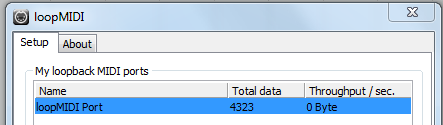 Add a port in loopMIDI
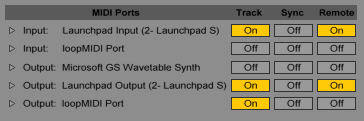 Turn off loopMIDI track input
Turn on loopMIDI track output
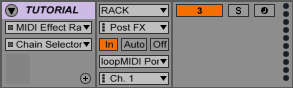 Set track output to loopMIDI
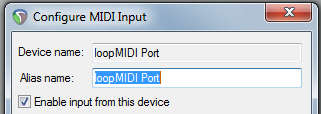 Enable loopMIDI input
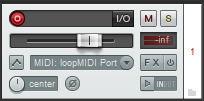 Select loopMIDI input and arm for record
Changelog
BETA3 22/06/2015- Multicolour/velocity support
- Different options for held notes
BETA2 20/06/2015
- Multi-track support
- Show held notes
- Cross browser support
- Removed quantise function
BETA1 07/06/2015
- Initial beta
- Single track support on Chrome
Planned features
- Open .ALS files directly - add support for live mashup tracks on session mode
- Extract track names from MIDI
- Add support for sections - Intro, verse, etc.
- Animate/step through sequence
- Add support for CC messages/top row
Test files
- 1234.mid - Test 4 single notes
- 1234inc.mid - Test 4 notes incremental
- all.mid - Test every note
- hold.mid - Test held notes
- multitrack.mid - Complex multitrack file
- lightshow.mid - Multicolour lightshow